Get and read logs from AWS CloudWatch with saw

For all the people painfully read logs on AWS CloudWatch console, saw is your friend.

Get CloudWatch log groups start with paradise-api:

1
2
πœ† saw groups --profile ap-prod --prefix paradise-api
paradise-api-CloudFormationLogs-mwwmzgYOtbcB

Get last 2 hours logs for paradise-api from CloudWatch, with saw:

1
πœ† saw get --profile ap-prod --start -2h paradise-api-CloudFormationLogs-mwwmzgYOtbcB --prefix docker | jq .log | sed 's/\\\n"$//; s/^"//'

Read environment variables of a process in Linux

When try to get the content of any /proc/PID/environ file in more readable format, you can:

1
2
3
4
/proc/[pid]/environ
This file contains the environment for the process. The entries
are separated by null bytes ('\0'), and there may be a null byte
at the end.

A simple way is to apply xargs -0 -L1 -a on it:

  • -0 - read null-delimited lines,
  • -L1 - read one line per execution of command
  • -a - file read lines from file
1
2
3
4
5
6
7
8
9
10
11
12
13
# ps -aef
10101 3629 3589 0 Apr27 ? 00:00:00 /bin/bash bin/start
10101 3670 3629 0 Apr27 ? 00:00:00 /bin/bash bin/start-tomcat
10101 3671 3670 0 Apr27 ? 00:07:36 /usr/lib/jvm/java-11-amazon-corretto.x86_64/bin/java -Djava.util.logging.config.file=/usr/local/tomcat/conf/

# cat /proc/3629/environ
PATH=/usr/local/sbin:/usr/local/bin:/usr/sbin:/usr/bin:/sbin:/binHOSTNAME=27c44e8a5c7cJAVA_HOME=/usr/lib/jvm/java-11-amazon-corretto.x86_64HOME=/usr/local/tomcat

# xargs -0 -L1 -a /proc/3629/environ
PATH=/usr/local/sbin:/usr/local/bin:/usr/sbin:/usr/bin:/sbin:/bin
HOSTNAME=27c44e8a5c7c
JAVA_HOME=/usr/lib/jvm/java-11-amazon-corretto.x86_64
HOME=/usr/local/tomcat

AWS KMS decrypt for base64 encoded input

With AWS CLI version 2:

1
2
πœ† aws --version
aws-cli/2.1.17 Python/3.7.4 Darwin/20.3.0 exe/x86_64 prompt/off

Encrypt with AWS KMS key:

1
2
3
4
5
6
7
πœ† aws kms encrypt --profile personal \
--key-id e2695b79-cbe0-4c16-aa5e-b7dbf52df1f9 \
--plaintext "string-to-encrypt" \
--output text \
--query CiphertextBlob \
--cli-binary-format raw-in-base64-out
AQICAHjbJrIPgME ... lILuBSUdA==

Decrypt with AWS KMS key:

1
2
3
4
5
πœ† echo "AQICAHjbJrIPgME ... lILuBSUdA==" | base64 -D | \
aws kms decrypt --profile personal \
--ciphertext-blob fileb:///dev/stdin \
--output text \
--query Plaintext | base64 -D

Reference

A Modern Architecture Application

RAD (Rapid Application Development) of a Serverless application β€œNotification Service” on modern technologies, e.g. AWS CDK & SAM, AWS Step Functions, TypeScript, VS Code, Open API Top Down Design and Test Driven Development, in order to rapidly build a prototype, or a POC, verify and test some technologies and approaches.

Request Handler => Step Functions (orchestration for Lambda functions, represents a single centralized executable business process, outsources low level operations like retry / exception catch and handle. Another choice is SNS) => Service Providers

Have experienced of Terraform, Serverless, AWS SAM … now this time based on code over configuration principle, what you get is flexibility, predictability and more control. You focus on code you tell the tools what steps it has to complete directly. At the end of day, it is a simple matter of separation of concerns and single responsibility principle.

β€’ VS Code for API Spec editing

β€’ Postman API, Environment and Mock server, for QA team, then switch to real service in DEV/TEST environment

1
πœ† npm run openapi

β€’ openapi-generator generates model classes; typescript-json-validator generates JSON Schema and validator

1
2
πœ† openapi-generator generate -g typescript-node -i Notification\ API\ openapi.json -o Notification\ API\ generated
πœ† npx typescript-json-validator notificationRequest.ts NotificationRequest

β€’ Onboard on Kong / API Manager, https://konghq.com/kong/

β€’ CDK, is based on CloudFormation but abstract layer on the top of it. It can generates CloudFormation template file template.yaml

1
πœ† cdk synth --no-staging > template.yaml

β€’ Demo of local run and debug lambda, with background TSC watch process

1
2
3
4
πœ† npm run watch

πœ† sam local invoke RequestNotification9F9F3C31 -e samples/api-gateway-notification-event.json
πœ† sam local invoke RequestNotification9F9F3C31 -e samples/api-gateway-notification-event.json -d 5858

Data validation to make data integrity unbreachable will take a lot time.

ajv framework and performance benchmark, https://github.com/ebdrup/json-schema-benchmark

β€’ Code lint with eslint and prettier and automatically correction

β€’ Code commit rule enforcement

β€’ Change code and deploy AWS stack by CDK

1
πœ† cdk deploy --require-approval never --profile dev-cicd

β€’ Behavior Driven Test Framework Jest, https://github.com/facebook/jest, 2x / 3x faster than Karma, with code coverage, easy mocking

1
πœ† npm t

β€’ Automatically generate application changelog and release notes

1
πœ† npm run release:minor

β€’ Automatically generate application document

1
πœ† npm run docs

β€’ AWS resources created by CDK

β€’ Not Mono Repo app, which multiple projects all under one giant Repo

β€’ ONE AWS Layers put all dependent NPM libs and shared code into; size of Lambda functions, readability

β€’ AWS EventBridge tro trigger and send event to Request Handler, for scheduling task

β€’ Health Check, with Service Monitoring Dashboard, verify dependencies at the endpoints, keep Lambda warming up

1
πœ† curl https://c81234xdae8w1a9.execute-api.ap-southeast-2.amazonaws.com/health

Cloud computing and Serverless architecture let developers in fast lane for Application Development. Right now, there are so many low hanging fruit to pick up.

As developers, we should not always think about our comfort zone, we need to think about people who take over your work, think about BAU team to support the application. The codebase is not about you, but about the value that your code brings to others, and the organization that you work for.

Bring back MagSafe

My first published video, created by Apple Final Cut Pro, on YouTube for official channel title Bring back MagSafe regard to solution that bring one of the most innovative design from Apple, back to MacBook Pro, iPad … and Android phones https://www.youtube.com/watch?v=yvkJR4Y0FK0

Risk Management for CI/CD processes

Consider a full development and deployment cycle, and the potential risks involved during the different stages in CDP (CI / Continuous Integration, CD / Continuous Delivery, CDP / Continuous Deployment):

  • Code
Role Details
Stakeholders Individual Developer
Pair Programming Mentor
DBA
Security Team
Failure Points Logic flaws
Security flaws
Code standards issues
Safeguards Test Driven Development
Red/Green/Refactor
Linting tools
Testing Docker containers
Pair programming
Query analysis
Static code analysis
  • Commit
Role Details
Stakeholders Security Team Member for sign-off
Engineering Team Lead for sign-off
Failure Points Force pushes
Merge conflicts
Safeguards Master branch protections
3 member sign-off before master merge
Commit hooks
  • Test
Role Details
Stakeholders Individual Developer
QA Team
Failure Points Broken tests
Stale tests
False positive tests
Safeguards Weekly failure testing triage meeting to catch broken tests
Daily cron runs of test suite against mock prod environment
  • Deployment
Role Details
Stakeholders SysOps Team
Individual Developers
Support Team
Customers
Failure Points Broken deployments
Dropped customer traffic
Safeguards Blue/Green deployment
Traffic re-routing
Pre deployment spare instance warmup
Communicate out to support in order to verify proper staffing levels
  • Runtime
Role Details
Stakeholders Security Team
SysOps Team
Engineering Teams
Support Team
Customers
Failure Points High resource usage
Slow queries
Malicious actors
MProvider downtime
Safeguards Communicate out to support for new feature awareness and appropriate categories for issues regarding the component
System resource alarms for various metrics and slow DB log alerts
Instant maintenance page switchover capabilities
Status page on redundant providers
Application firewalls
Database replicas

AWS CloudWatch Metrics Example

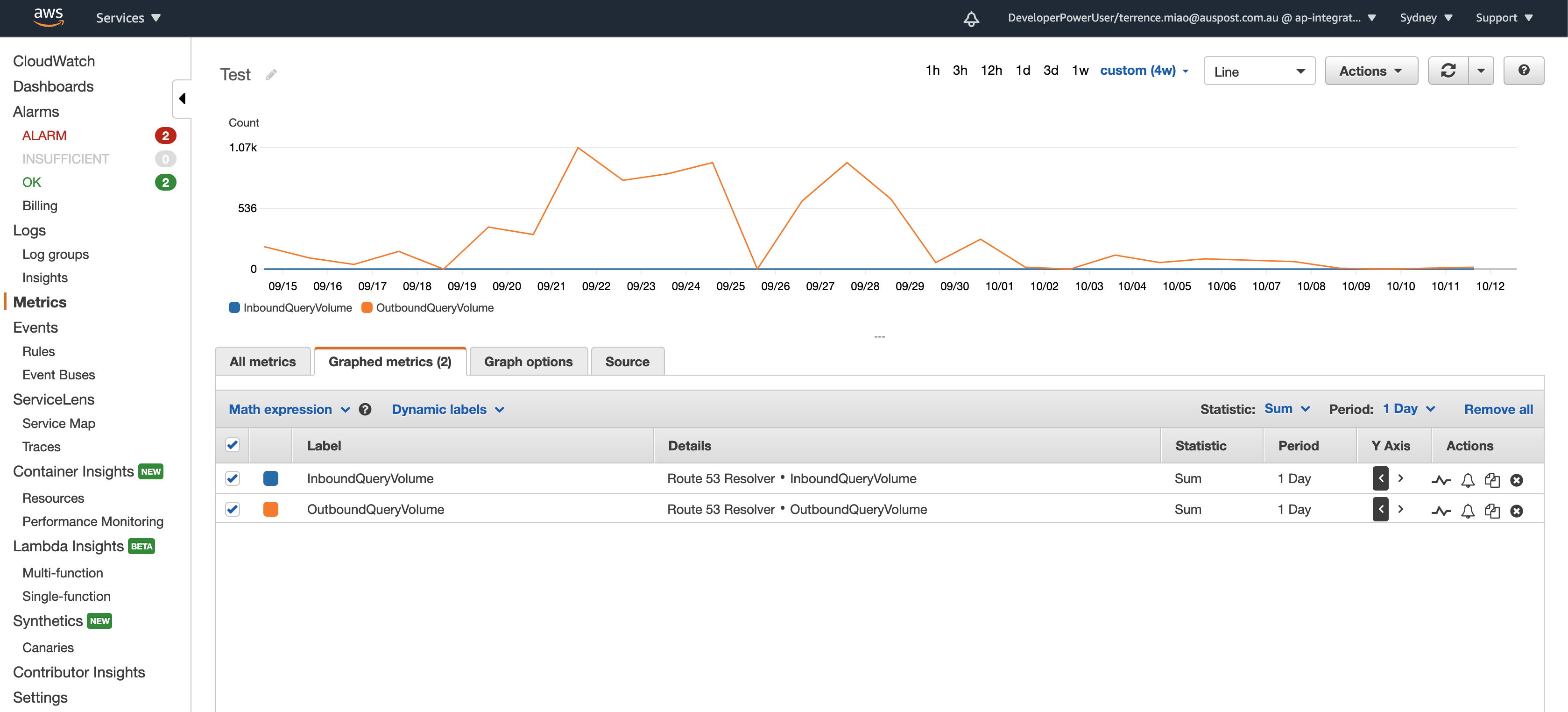
AWS CloudWatch Metrics

The interface of Metrics in AWS CloudWatch console:

AWS CloudWatch - Metrics

The URL:

1
https://ap-southeast-2.console.aws.amazon.com/cloudwatch/home?region=ap-southeast-2#metricsV2:graph=~(metrics~(~(~'AWS*2fRoute53Resolver~'InboundQueryVolume)~(~'.~'OutboundQueryVolume))~view~'timeSeries~stacked~false~region~'ap-southeast-2~stat~'Sum~period~86400~start~'-P28D~end~'P0D);query=~'*7bAWS*2fRoute53Resolver*7d

Metrics source:

1
2
3
4
5
6
7
8
9
10
11
12
{
"metrics": [
[ "AWS/Route53Resolver", "InboundQueryVolume" ],
[ ".", "OutboundQueryVolume" ]
],
"view": "timeSeries",
"stacked": false,
"region": "ap-southeast-2",
"stat": "Sum",
"period": 86400,
"title": "Test"
}

Creating AWS Lambda with AWS SAM

This is a simple Lambda with REST API and SNS enabled. Firstly, have a look the Nodejs script:

AWS SAM template yaml file:

Generate AWS CloudFormation yaml file and package / zip / create an artefact (need to create AWS S3 bucket hello-world-tub in advance):

1
2
3
4
5
6
πœ† sam package --profile personal --template-file template.yml --output-template-file cloudFormation.yml --s3-bucket hello-sam-tub
Uploading to 7431f83ac979bfccc26980049807e595 1461 / 1461.0 (100.00%)

Successfully packaged artifacts and wrote output template to file cloudFormation.yml.
Execute the following command to deploy the packaged template
sam deploy --template-file /Users/terrence/Projects/hello-sam/cloudFormation.yml --stack-name <YOUR STACK NAME>

Can also create artefact file with zip command, and upload zip file into AWS S3 bucket:

1
πœ† zip hello-sam.zip README.md index.js template.yml

What AWS CloudFormation yaml file looks like:

Deploy application’s AWS CloudFormation stack with AWS SAM command:

1
2
3
4
5
6
7
8
9
10
11
12
13
14
15
16
17
18
19
20
21
22
23
24
25
26
27
28
29
30
31
32
33
34
35
36
37
38
39
40
41
42
43
44
45
46
47
48
49
50
51
52
53
54
55
56
πœ† sam deploy --profile personal --template-file cloudFormation.yml --stack-name hello-sam --capabilities CAPABILITY_IAM

Deploying with following values
===============================
Stack name : hello-sam
Region : None
Confirm changeset : False
Deployment s3 bucket : None
Capabilities : ["CAPABILITY_IAM"]
Parameter overrides : {}

Initiating deployment
=====================

Waiting for changeset to be created..

CloudFormation stack changeset
---------------------------------------------------------------------------------------------------------------------------------------------------------------------------------------------------------------------------------------------------------------------------------------
Operation LogicalResourceId ResourceType
---------------------------------------------------------------------------------------------------------------------------------------------------------------------------------------------------------------------------------------------------------------------------------------
+ Add HelloWorldFunctionHelloWorldApiPermissionProd AWS::Lambda::Permission
+ Add HelloWorldFunctionRole AWS::IAM::Role
+ Add HelloWorldFunction AWS::Lambda::Function
+ Add HelloWorldTopic AWS::SNS::Topic
+ Add ServerlessRestApiDeployment79454cea13 AWS::ApiGateway::Deployment
+ Add ServerlessRestApiProdStage AWS::ApiGateway::Stage
+ Add ServerlessRestApi AWS::ApiGateway::RestApi
---------------------------------------------------------------------------------------------------------------------------------------------------------------------------------------------------------------------------------------------------------------------------------------

Changeset created successfully. arn:aws:cloudformation:ap-southeast-2:123456789012:changeSet/samcli-deploy1581737165/48e53ff2-1b50-45d8-bbfd-97652f20d967


2020-02-15 14:26:10 - Waiting for stack create/update to complete

CloudFormation events from changeset
-------------------------------------------------------------------------------------------------------------------------------------------------------------------------------------------------------------------------------------------------------------------------------------
ResourceStatus ResourceType LogicalResourceId ResourceStatusReason
-------------------------------------------------------------------------------------------------------------------------------------------------------------------------------------------------------------------------------------------------------------------------------------
CREATE_IN_PROGRESS AWS::SNS::Topic HelloWorldTopic Resource creation Initiated
CREATE_COMPLETE AWS::SNS::Topic HelloWorldTopic -
CREATE_IN_PROGRESS AWS::IAM::Role HelloWorldFunctionRole Resource creation Initiated
CREATE_COMPLETE AWS::IAM::Role HelloWorldFunctionRole -
CREATE_IN_PROGRESS AWS::Lambda::Function HelloWorldFunction Resource creation Initiated
CREATE_COMPLETE AWS::Lambda::Function HelloWorldFunction -
CREATE_IN_PROGRESS AWS::ApiGateway::RestApi ServerlessRestApi Resource creation Initiated
CREATE_COMPLETE AWS::ApiGateway::RestApi ServerlessRestApi -
CREATE_IN_PROGRESS AWS::Lambda::Permission HelloWorldFunctionHelloWorldApiPermissionProd Resource creation Initiated
CREATE_IN_PROGRESS AWS::ApiGateway::Deployment ServerlessRestApiDeployment79454cea13 Resource creation Initiated
CREATE_COMPLETE AWS::ApiGateway::Deployment ServerlessRestApiDeployment79454cea13 -
CREATE_IN_PROGRESS AWS::ApiGateway::Stage ServerlessRestApiProdStage Resource creation Initiated
CREATE_COMPLETE AWS::ApiGateway::Stage ServerlessRestApiProdStage -
CREATE_COMPLETE AWS::Lambda::Permission HelloWorldFunctionHelloWorldApiPermissionProd -
CREATE_COMPLETE AWS::CloudFormation::Stack hello-sam -
-------------------------------------------------------------------------------------------------------------------------------------------------------------------------------------------------------------------------------------------------------------------------------------

Successfully created/updated stack - hello-sam in None

NOTE: The --capabilities CAPABILITY_IAM option is necessary to authorise your stack to create IAM roles, which SAM applications do by default.

After application deployed, user subscribes notification will receive email titled - AWS Notification - Subscription Confirmation After confirmation, user will receive an email every time API is invoked.

Now log on AWS Console, have a look the resources this Lambda application used in CloudFormation, S3 Bucket, Lambda, IAM, SNS, CloudWatch, API Gateway.

After this Lambda application successfully deployed into AWS, you will receive an email asking whether you want to subscribe the SNS topic. You can also unsubscribe the SNS topic. You can manually test Lambda function in AWS Console.
References